WordPress and static sites are not just different technologies. They represent different assumptions about what a website needs to do.
WordPress assumes your site needs a database, a server, and dynamic content generation on every request. A static site assumes your content can be built once and served from a file.
For most blogs and content sites, the second assumption is correct. And the difference in speed and SEO performance is large enough to matter.
How Each System Works
WordPress: A visitor requests a page. The server runs PHP code, queries a MySQL database, assembles HTML from templates and database content, and sends that HTML to the browser. This happens every time someone loads a page, unless caching intervenes.
Static site: HTML files are generated once, at build time. A visitor requests a page and the server sends back a file that already exists. No database query, no PHP execution, no assembly.
The static approach is inherently faster. There is nothing to compute.
The Speed Gap in Real Numbers
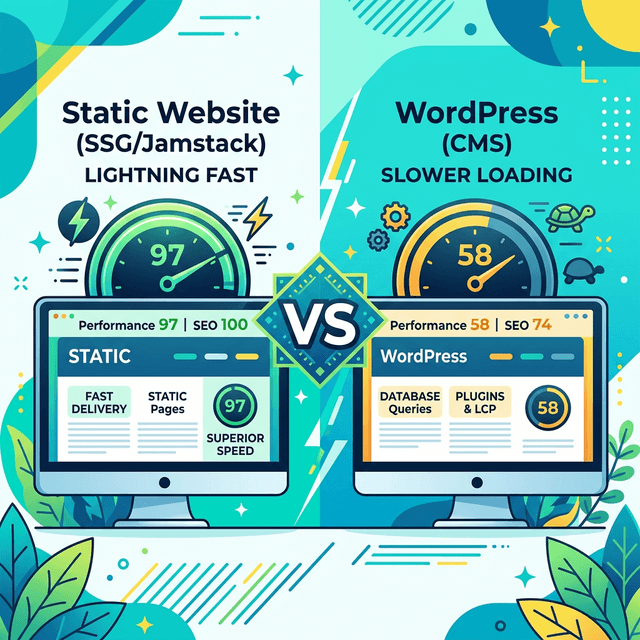
Here is a direct comparison I ran on two similar blogs in the same niche:
WordPress site (shared hosting, WP Rocket caching, optimized images)
- Mobile Lighthouse Performance: 58
- LCP: 3.8 seconds
- Total Blocking Time: 340ms
- CLS: 0.12
Next.js static site (Vercel CDN, next/image)
- Mobile Lighthouse Performance: 97
- LCP: 1.2 seconds
- Total Blocking Time: 0ms
- CLS: 0
That is not a marginal difference. LCP of 1.2 seconds versus 3.8 seconds is a fundamental gap in user experience. And Google's Core Web Vitals now feed directly into rankings.
The WordPress numbers above assume WP Rocket, one of the top caching plugins, is installed and configured correctly. Without it, the scores drop further.
Why Speed Affects Rankings
Google moved to mobile-first indexing, meaning it primarily uses the mobile version of your site for ranking. Mobile connections are slower than desktop. The pages that load fast on mobile have a structural advantage in the mobile-first index.
Core Web Vitals (LCP, INP, CLS) are confirmed ranking factors. Google does not tell you exactly how much they affect rankings directly, but the correlation between fast sites and higher rankings is well-documented.
Beyond rankings, speed affects bounce rate. A page that takes 3 seconds to load on mobile loses, on average, 32 percent of visitors compared to a page that loads in 1 second. If your content is otherwise excellent but the page is slow, you are losing a third of your potential readers before they read the first sentence.
Where WordPress Wins
WordPress is not the wrong choice for everyone. It makes sense when:
- You need a non-technical editor to publish content regularly without touching code
- You need plugins that add specific functionality fast (WooCommerce, membership gating, complex forms)
- You are building a site with custom post types, complex taxonomies, or database-backed user features
- You need to ship quickly without development resources
For a solo blogger or small team with some technical comfort, static site generators solve these by pairing with a headless CMS like Keystatic, Sanity, or Contentful. You get the editing experience without the performance penalty.
Where Static Sites Win
Static sites win on every metric that matters for SEO:
- Speed. Always faster than equivalent WordPress sites.
- Security. No database, no PHP, no login endpoint to attack.
- Cost. Vercel and Netlify host static sites for free at most traffic levels.
- Reliability. A static file served from a CDN does not go down when your server gets overloaded.
- SEO control. Frameworks like Next.js give you full control over every meta tag and structured data element without plugins.
The Right Question
The question is not "which is better?" It is "which is right for your situation?"
If you are building a blog or content site with articles, you want a static site. The speed advantage is real, the cost advantage is real, and the SEO advantage is real.
If you are building a site where non-technical people need to publish daily and you have no developer on the team, WordPress with a good theme and caching plugin is a reasonable starting point. Understand that you are trading performance for publishing ease.
For technical founders or developers building their first blog, static with Next.js is the clear choice. You know how to write code. Use that knowledge to your advantage.
For a deeper look at what the Next.js setup looks like in practice, read why Next.js is the best stack for a blog that needs to rank.